

LightRoom Presets
Free Western Wedding Preset: Get The Stunning Photo Filter Look
Dec
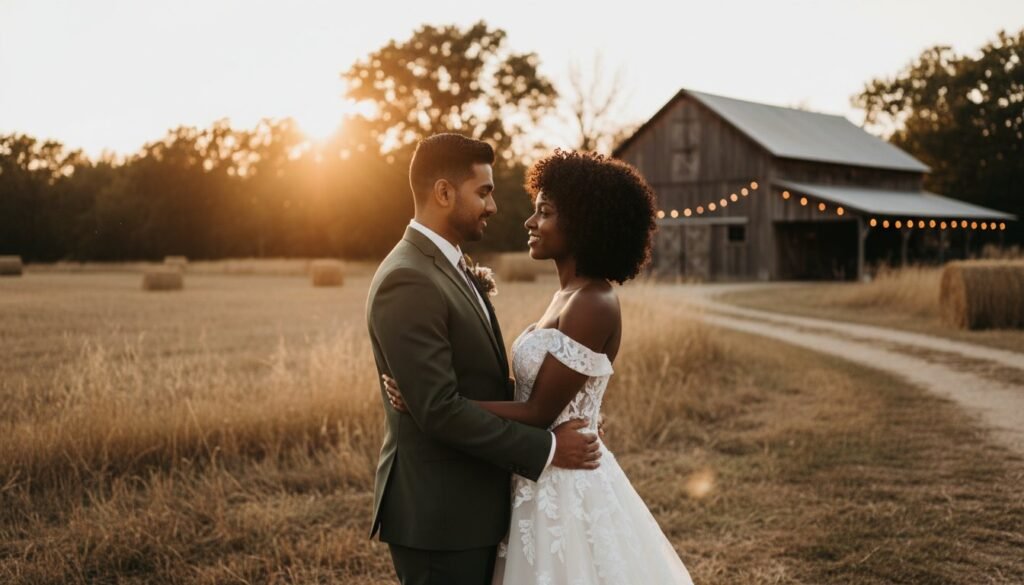
Ready to give your wedding photos that beautiful, warm, and rustic western vibe you’ve been dreaming of? You’re in the right place! In just a few seconds, you can completely transform your images with our professional, one-click photo filter. Download our free preset and see the magic for yourself.
Get Your Free Western Preset (Instant Download!)
Say goodbye to flat, uninspired photos and hello to a warm, rustic, and timeless feel. This powerful preset adds a beautiful, cohesive look to your wedding pictures in a single click. Best of all, this free preset works perfectly with both Lightroom Desktop and the free Lightroom Mobile app, so you can edit like a pro on any device. Ready to get started? Download Your Free Western Preset Now!
What You’ll Get: The Perfect Western Vibe
This isn’t just any filter; it’s a carefully crafted preset designed to bring out the best in your wedding photography. Expect to see rich, earthy tones that beautifully enhance outdoor and rustic settings, from countryside barns to golden-hour fields. It creates soft, flattering skin tones that are absolutely perfect for wedding portraits, ensuring everyone looks their best. Finally, it adds a touch of cinematic warmth for a magical, memorable look that will make your photos feel like stills from a romantic film. See for yourself how this single-click preset transforms a standard wedding photo into a work of art with a warm, western feel.
How to Install & Use Your Preset in 1 Minute
No experience? No problem! Follow these simple steps to start using your new preset in no time. Our presets are fully compatible with both JPEG and RAW images, giving you complete flexibility for your editing workflow.
For Lightroom Mobile (Using DNG file)
- Download the DNG file directly to your phone.
- Open the Lightroom app and import the DNG file as if it were a new photo.
- With the newly imported DNG image open on your screen, tap the three dots (…) in the top right corner.
- Select ‘Create Preset’ from the menu, give your new preset a name (like “Western Wedding”), and save it.
- That’s it! You can now open any of your photos and apply your new preset from the ‘Presets’ tab.
For Lightroom Desktop (Using XMP file)
- Open Lightroom Classic or Lightroom CC on your computer.
- Navigate to the ‘Develop’ module where you do your editing.
- On the ‘Presets’ panel on the left-hand side, click the small ‘+’ icon.
- Select ‘Import Presets’ from the dropdown menu and navigate to the XMP file you downloaded.
- Your new western preset is now installed and ready to use on your entire photo collection!
Why Use a Lightroom Preset Instead of a Photoshop Action?
You might have searched for a Photoshop action, but for achieving this specific style across multiple photos, a Lightroom preset is your best friend. Professional photographers prefer using Lightroom for applying a consistent look to a whole gallery, and here’s why.
Speed and Efficiency for Weddings
Lightroom is specifically designed for editing hundreds of photos at once, making it the perfect tool for a wedding gallery. You can apply your western preset to an entire collection of photos in just a few minutes, creating a beautiful, consistent look. Photoshop, on the other hand, is better suited for detailed, single-image retouching like removing objects or complex skin editing.
Easy, Non-Destructive Adjustments
One of the biggest advantages of Lightroom is that editing is non-destructive, meaning your original photo is always kept safe and unchanged. After applying a preset, you can easily tweak the settings with simple sliders to get the perfect result for each individual photo. This gives you full creative control without any risk of permanently altering your original image.
Love This Look? Discover Our Best-Selling Wedding Preset Packs
Your free preset is just a taste of what’s possible for your photos. If you love this style, you can elevate your entire photo gallery with our complete, high-quality collections that have been trusted by thousands of photographers worldwide.
The Ultimate Wedding Collection
This is our #1 best-selling pack for a reason. It’s designed to give you professional, timeless wedding photos every time. The collection includes a huge variety of styles, from bright and airy to dark and moody, ensuring you have the perfect look for any lighting situation or wedding theme. Explore the full Wedding Preset Collection and take your editing to the next level.
Boho & Rustic Preset Pack
If you can’t get enough of that earthy, romantic feel, this pack is for you. It’s perfect for outdoor, bohemian, and western-themed weddings. These presets deepen the warm, earthy tones and create a dreamy, cohesive atmosphere across all your images. Get the complete Boho & Rustic look for a stunning and memorable wedding album.
Frequently Asked Questions
Is this Lightroom preset really free?
Yes, absolutely! This preset is 100% free for you to download and use. It’s our way of showing you the quality and power of our products.
Does this preset work on my iPhone or Android photos?
Yes! The preset comes with a DNG file that is designed specifically for the free Adobe Lightroom Mobile app, which works perfectly on both iPhone and Android devices.
What’s the difference between a preset and a photo filter?
A preset is a more advanced and customizable version of a filter. While a filter applies a set look, a preset is a collection of saved Lightroom settings that you can easily adjust and fine-tune to perfectly match your photo.
Can I adjust the preset after I apply it to my photo?
Of course! That’s the beauty of using Lightroom presets. After you apply the preset, all of the adjustment sliders in Lightroom are available for you to make any changes you like to brightness, contrast, color, and more.
Will this work with the free version of the Lightroom app?
Yes, it will. Our mobile presets are designed to be fully compatible with the free version of the Lightroom Mobile app, so you don’t need a paid subscription to get professional-looking photos.
Ready to transform your wedding photos with a beautiful, warm, and rustic western feel? Join thousands of happy photographers and creators who use our presets to save time and create stunning images. This free preset works on both Mobile & Desktop and is available for instant download. Click the link below to get started and give your photos the look they deserve! Download Your Free Western Preset Now!
