



LightRoom Presets
Lightroom Classic Presets: Your Guide to Stunning Photos in One Click

Dec
Tired of spending hours editing photos in Lightroom Classic, only to feel like your images still lack that professional touch? You’re in the right place. This guide will show you how Lightroom Classic presets can completely transform your photos with a single click. Learn what they are, how to choose the best ones for your unique style, and get ready to create stunning, consistent images faster than ever before.
What Are Lightroom Classic Presets (And Why You Need Them)
So, what exactly are Lightroom Classic presets? Think of them as powerful, one-click filters designed specifically for your desktop editing software. A preset is a saved combination of photo editing settings—like exposure, contrast, color tones, and sharpness—all bundled into a single template. When you apply a preset to a photo, it instantly implements all those settings, giving you a professional, polished look in seconds.
This is a game-changer for photographers of all levels. Presets are the ultimate shortcut to achieving a specific aesthetic, and they are perfect for batch editing hundreds of photos from a single photoshoot. Imagine editing an entire wedding or travel gallery with a consistent, beautiful style in just a fraction of the time it would normally take.
The Biggest Benefits for Your Workflow
- Save hours of manual editing time. Stop tweaking endless sliders and get back to what you love—shooting. Presets automate the most time-consuming parts of editing, streamlining your entire process.
- Create a consistent, signature photo style. A cohesive look is what separates amateurs from pros. Presets ensure every photo in your portfolio, blog, or Instagram feed shares the same professional aesthetic, building a strong and recognizable brand.
- Learn new editing techniques by studying presets. Presets aren’t just a shortcut; they’re a learning tool. After applying a preset, you can look at the sliders to see exactly how that look was created, helping you master advanced editing techniques.
- Experiment with different looks without any risk. Not sure if a moody or an airy style is right for you? With presets, you can easily try on different aesthetics without permanently changing your original image, giving you total creative freedom.
XMP vs. LRTEMPLATE: What You Need to Know
When you start looking for presets, you might come across different file types. The most important thing to know is that modern versions of Lightroom Classic use .XMP files. This is the current standard format that ensures your presets work seamlessly across the latest Adobe applications, including Lightroom Classic, Lightroom CC, and even Adobe Camera Raw in Photoshop.
In the past, older versions of Lightroom used the .lrtemplate format. While some older presets might still use this, all high-quality, modern presets—including all of ours—use the universal .XMP format. This guarantees you get a hassle-free experience with maximum compatibility.
How to Choose the Perfect Lightroom Classic Presets
With thousands of presets available, finding the right ones can feel overwhelming. The key is to choose presets that complement your photography subjects and match the aesthetic you want to achieve. A preset designed for dark, moody portraits won’t look right on a bright, sunny beach photo. Making the right choice upfront is essential for a great edit.
First, Identify Your Photography Style
Before you start browsing, take a moment to think about your work. Are you a wedding photographer capturing romantic moments, a travel photographer documenting vibrant landscapes, or a portrait photographer creating dramatic shots? The subject of your photos plays a huge role in which presets will work best.
Next, consider your preferred aesthetic. Do you love the popular dark and moody look you see on Instagram? Or do you prefer a bright, clean, and airy style? By narrowing down your niche and your stylistic preference, you can choose preset packs that are specifically designed to make your photos shine.
Free vs. Paid Presets: Is There a Difference?
You’ll quickly notice both free and paid presets are available. Free presets are a fantastic way to experiment and learn the basics without any commitment. However, when you’re ready to achieve truly professional results, investing in paid presets makes a world of difference. Paid presets are crafted by expert editors to offer superior quality, consistency, and versatility across a wide range of lighting conditions.
Furthermore, premium presets almost always come with detailed installation guides and dedicated customer support, so you’re never left struggling. If you’re serious about elevating your photography, investing in a high-quality collection is one of the best decisions you can make. Ready to see the difference? Explore our top-rated professional presets!
Our Top Preset Collections for Lightroom Classic
We’ve designed our preset collections to help you find the perfect look for any project, no matter your style. Best of all, every pack is optimized to work flawlessly on both Lightroom Classic for desktop and the free Lightroom Mobile app, giving you a consistent look everywhere you edit.
For Weddings: Bright & Airy Presets
Create the timeless, romantic wedding photos of your dreams. Our Bright & Airy presets are designed to enhance natural light, soften skin tones, and produce a dreamy, elegant feel. They are perfect for everything from bridal portraits and detail shots to sun-drenched ceremony photos, giving every image a light and beautiful touch.
For Influencers: Moody & Dark Presets
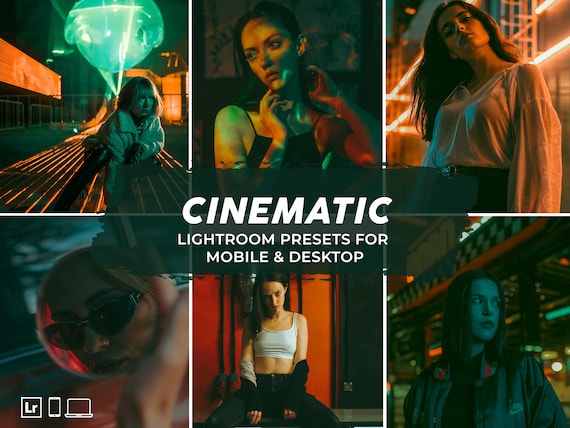
Get that popular deep, cinematic look that dominates Instagram feeds. Our Moody & Dark presets create rich, dramatic tones and stunning contrast that make your photos stand out. This style is ideal for lifestyle photos, fashion shoots, and blogger content, adding an emotional and powerful vibe to your images.
For Travel: Cinematic & Vibrant Presets
Make your travel and landscape photos pop with color and life. Inspired by the rich, saturated look of film, our Cinematic presets will give your adventures an epic, movie-like quality. These presets enhance the natural beauty of your destinations, turning your travel snapshots into gallery-worthy art.
Quick Guide: How to Install Presets in Lightroom Classic
Worried that installing presets is complicated? Don’t be! It’s an incredibly simple process that takes just a few minutes. You’ll be transforming your photos with your new looks before you know it.
The 3-Step Installation Process
- Unzip your files: After downloading your presets, locate the .zip file in your ‘Downloads’ folder and double-click it to unzip it. This will reveal a folder containing your .XMP preset files.
- Open Lightroom Classic: Launch Lightroom and go to the ‘Develop’ module (you can press ‘D’ on your keyboard as a shortcut). On the left side, you’ll see the ‘Presets’ panel.
- Import your presets: Click the small plus (+) icon at the top of the Presets panel and select ‘Import Presets’. Navigate to the folder you unzipped in step one, select the .XMP files, and click ‘Import’. That’s it! Your new presets will appear in the panel, ready to use.
Frequently Asked Questions
Do these presets work with the free Lightroom Mobile app?
Yes, absolutely! All of our preset collections are designed for full compatibility with both the desktop version of Lightroom Classic and the free Lightroom Mobile app. You can edit seamlessly on your computer or on the go with a consistent style.
Can I customize a preset after I apply it?
Of course. Think of presets as a starting point. After you apply a preset, all of the adjustment sliders are fully editable. You can tweak the exposure, contrast, colors, and more to perfectly match your specific photo and achieve your desired look.
What’s the difference between Lightroom Classic and Lightroom CC presets?
In the past, these two programs used different file types, but not anymore! Thanks to the modern .XMP format, our presets work perfectly in both Lightroom Classic (the desktop-focused version) and Lightroom CC (the cloud-based version). You can use them across the entire Adobe ecosystem.
Will these presets work on my JPG and RAW photos?
Our presets work on both JPG and RAW files. However, we highly recommend shooting in RAW format. RAW files contain much more image data, which gives you significantly more flexibility when editing and allows the presets to produce the highest-quality results.
What if I don’t like the presets after I buy them?
We’re confident you’ll love the way our presets transform your photos! We’ve helped over 250,000 photographers and creators elevate their work. If you have any trouble or questions, our dedicated support team is always here to help you get the most out of your purchase.
Ready to stop wasting time and start creating incredible photos with just one click? Your signature style is waiting. With instant downloads, you can begin transforming your images today. Join over 250,000 happy customers and discover the perfect look for your photos. Shop All Lightroom Classic Presets Now!
